To use Apple Pay with the Web SDK, you must register and verify your domain.
Overview
A new permanent domain registration method replaces the legacy, time-bound verification process.
| Legacy Method | New Method (Recommended) |
|---|---|
| Time-bound domain whitelisting | Permanent domain registration |
| Expires every 6 months | No expiry |
| Manual re-verification required | Automated validation |
| Risk of service disruption | Stable, long-term setup |
The legacy method will continue to work temporarily, but you should migrate to the new approach to avoid future payment disruptions.
### When to Complete This
Complete domain registration after your production go-live.
### Prerequisites
- Apple Pay Web SDK integration completed
- Production access enabled
- Valid HTTPS domain
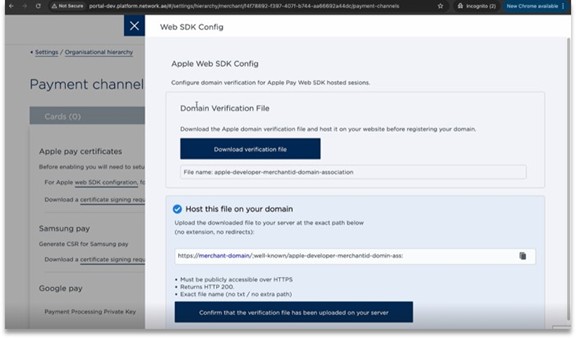
### Step 1: Access Web SDK Configuration
Log in to the N-Genius Online portal and navigate to:
Settings → Organisational Hierarchy → Payment Channels → Wallets → Web SDK Configuration
### Step 2: Download the Verification File
- Locate Domain Verification File
- Click Download verification file
Do not rename the file. It must remain exactly:
apple-developer-merchantid-domain-association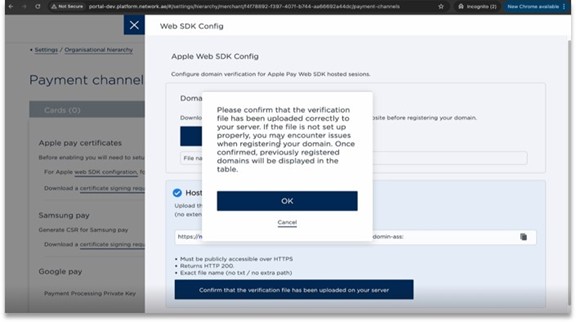
### Step 3: Host the Verification File
Upload the file to:
https://<your-domain>/.well-known/apple-developer-merchantid-domain-associationRequirements
- Must be publicly accessible over HTTPS
- Must return HTTP 200 OK
- No redirects (301/302 not allowed)
- No file extension
- Exact path and filename required
### Step 4: Confirm File Upload
- Return to the portal
- Click Confirm that the verification file has been uploaded
- Click OK on the confirmation message
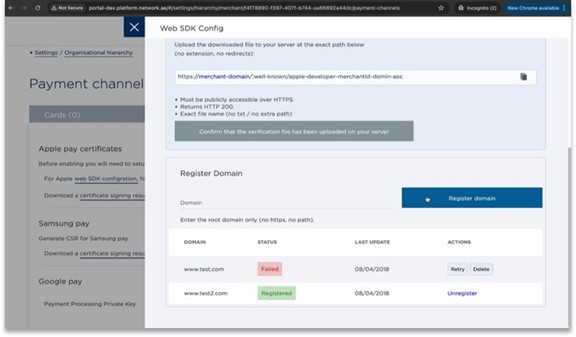
### Step 5: Register Your Domain
-
Enter your root domain only
- Example:
example.com - Do not include
https://or paths
- Example:
-
Click Register domain
Once successful, the status will display:
Registered
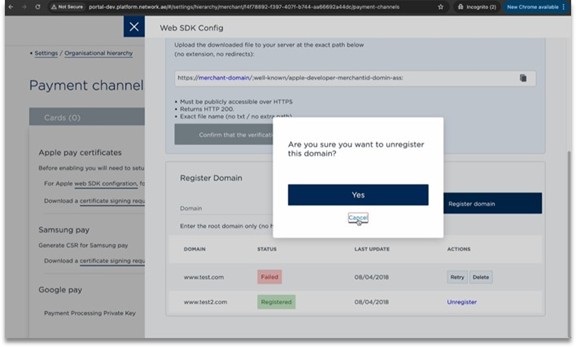
### Managing Domains
| Status | Action |
|---|---|
| Failed | Retry or delete and re-register |
| Registered | No further action required |
To remove a domain:
- Click Unregister
- Confirm the action
### Best Practices
- Complete registration immediately after go-live
- Maintain a valid SSL certificate
- Ensure
.well-knownis publicly accessible - Avoid CDN/WAF blocking the file
### FAQ
Do I still need the legacy verification?
No. The legacy method expires after 6 months. Migrate to the new method.
Do I need to configure each environment separately?
Yes. Each domain must be registered individually.
Can I register subdomains?
Yes, but each subdomain must be registered separately.