

Android SDK v7.0.0 introduces a major upgrade to the N-Genius Online Android SDK experience, including a new Unified Payment Page, AANI QR Code payments, Click to Pay enhancements, UI refreshes, SDK theming support, localization improvements, and updated testing workflows.
Overview
This release also introduces several developer-focused improvements to simplify environment management, testing, and SDK customisation.
Release Date: March 2026
Platform: Android
Version: v7.0.0-beta
Distribution & Testing
Version 7.0.0 is available for early access testing via Google Play Internal Testing.
Invited testers can install the demo application directly from the Play Store without sideloading APKs.
Play Store Internal Testing Setup
| Step | Description |
|---|---|
| Accept Invite | Open the internal testing invitation link and join the testing programme. |
| Install from Play Store | After joining, download or update the application directly from Google Play. |
| Wait for Propagation | It may take up to 10 minutes before the build becomes visible in the Play Store. |
| Configure Environment | Configure the merchant environment manually or via QR code import. |
Note: Only users explicitly added to the internal testing track can access the build.
Unified Payment Page
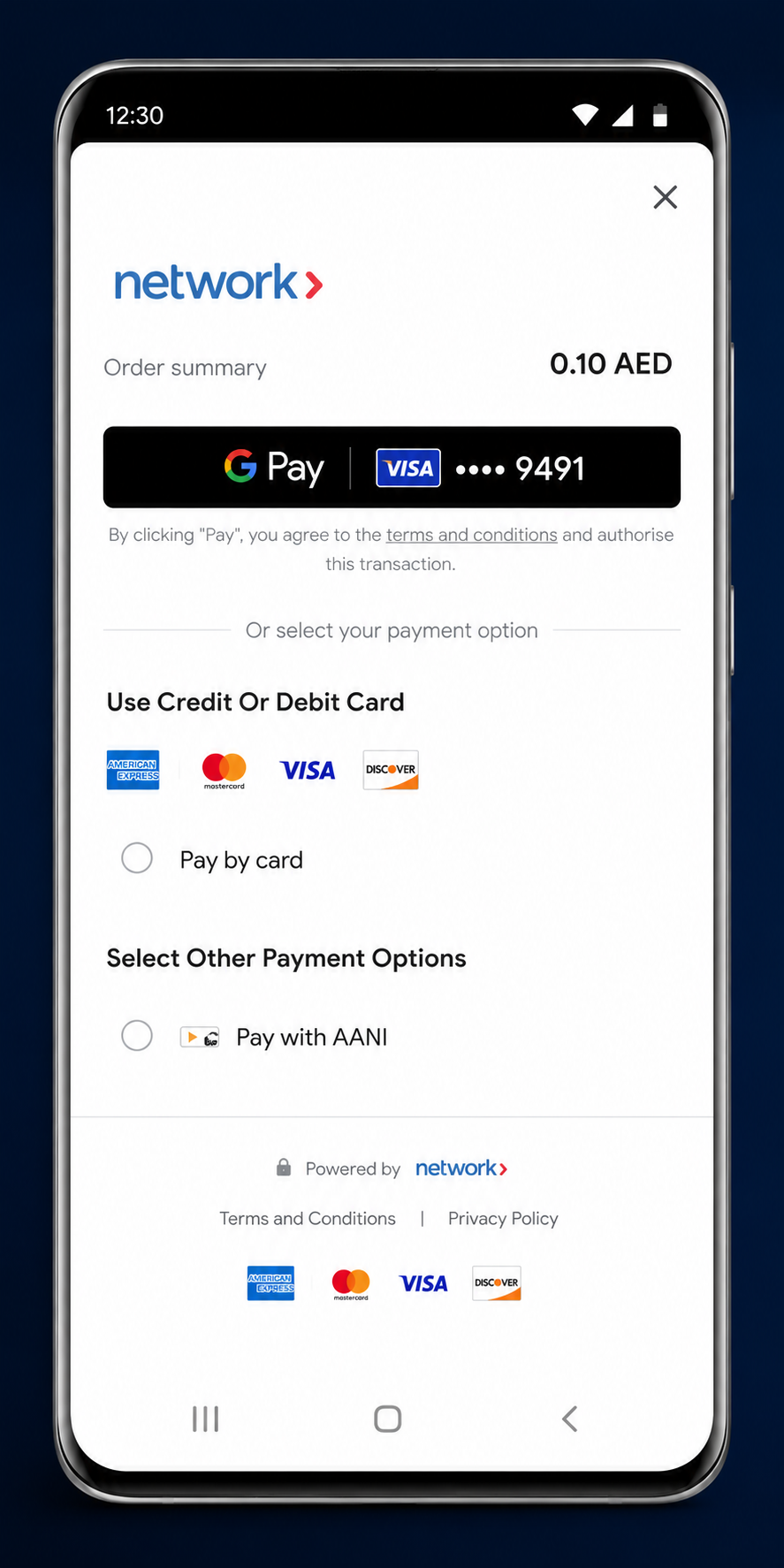
The SDK now exposes a single Unified Payment Page that consolidates all supported payment methods into one streamlined checkout experience.
The payment page dynamically adapts based on the outlet configuration and only displays enabled payment methods.
Supported Payment Methods
- Credit and Debit Cards
- Google Pay
- Samsung Pay
- AANI Pay
- Click to Pay
Wallet Priority
When multiple wallet options are available, the SDK applies the following display priority:
- Google Pay
- Samsung Pay
Additional payment methods appear under the expandable payment options section.
API Renaming
The launcher classes have been renamed to align with the new Unified Payment Page architecture.
| Deprecated Name | New Name |
|---|---|
PaymentsLauncher | UnifiedPaymentPageLauncher |
PaymentsRequest | UnifiedPaymentPageRequest |
PaymentsResult | UnifiedPaymentPageResult |
Existing launcher classes remain functional but are now deprecated.
Unified Payment Page Preview
AANI QR Code Payments
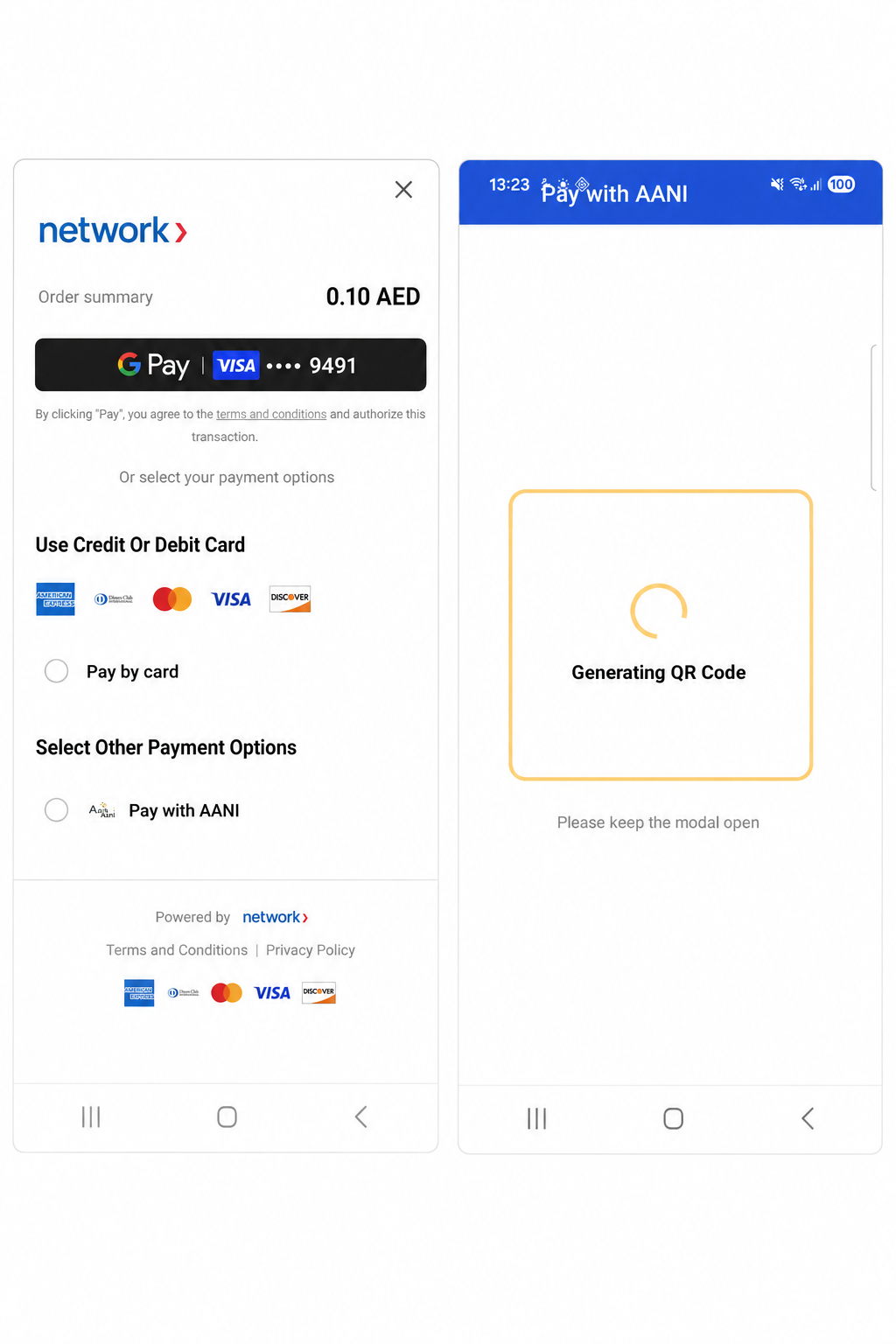
The SDK now supports QR code-based AANI payments as an alternative to the existing alias-based payment flow.
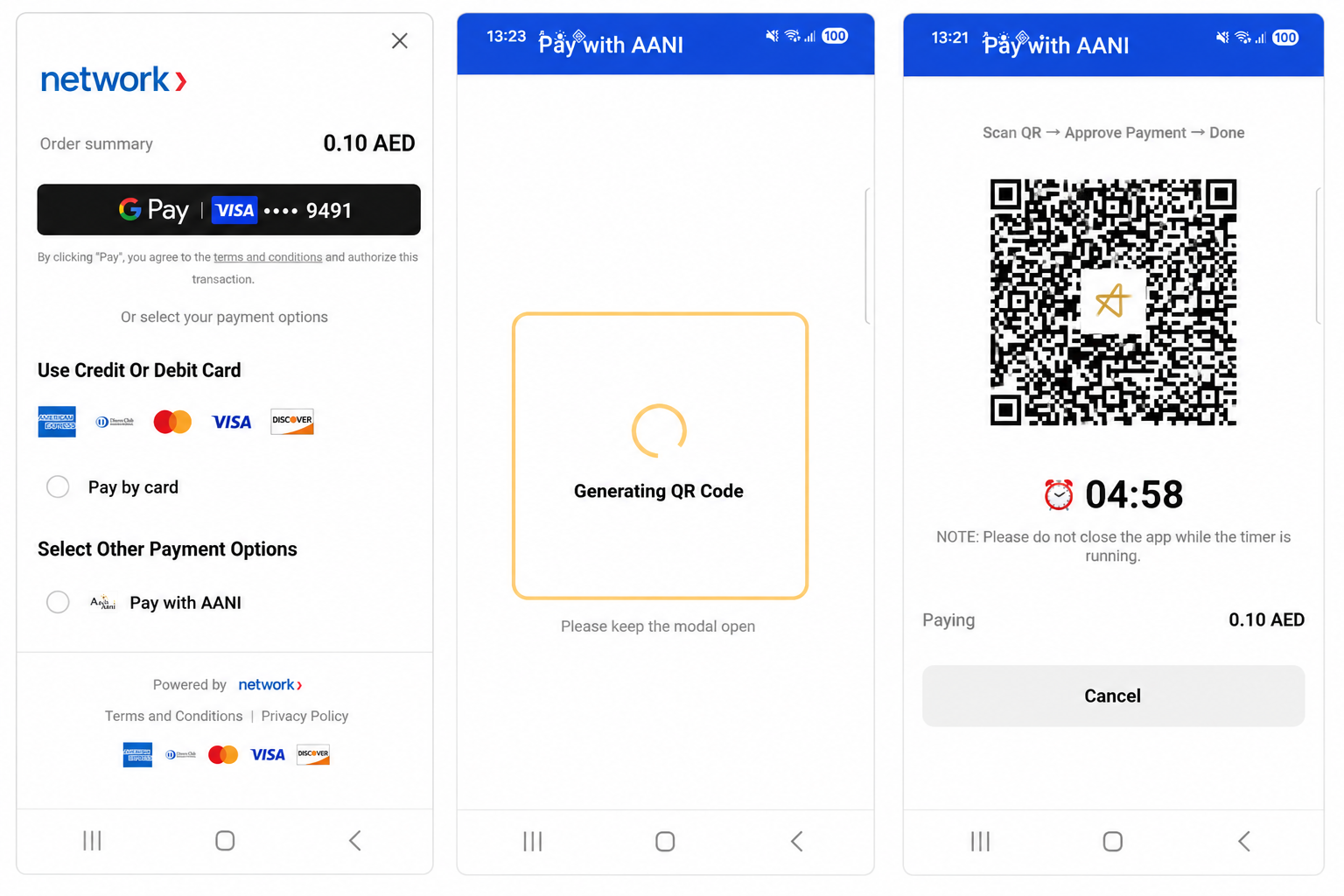
Customers can scan a dynamically generated QR code using supported banking applications to complete payment.
Payment Flow
- User selects QR Code from the AANI payment type dropdown
- User taps Generate QR Code
- SDK generates the QR code server-side
- QR code is displayed with a 5-minute countdown timer
- Customer scans the QR code using their banking application
- SDK polls payment status every 5 seconds
- Payment result is displayed automatically
flowchart TD

    %% --- Customer Action Phase ---
    subgraph Customer Interaction
        A["Select QR Code<br>from AANI payment dropdown"]
        B[Tap Generate QR Code]
        F["Scan QR Code<br>using banking app"]
    end

    %% --- System Processing Phase ---
    subgraph System Processing
        C["SDK requests QR code<br>from server"]
        D[QR code generated]
        E["Display QR code<br>+ 5-minute timer"]
        G["Poll payment status<br>(every 5 seconds)"]
    end

    %% --- Outcome Phase ---
    subgraph Payment Outcome
        H{Payment completed?}
        I[Display payment success]
        J[Display payment failure]
    end

    %% --- Flow ---
    A --> B
    B --> C
    C --> D
    D --> E
    E --> F
    F --> G
    G --> H
    H -- Yes --> I
    H -- No / Failed --> J
AANI QR Generation Screen
AANI QR Payment Screen
Label Updates
| Previous Label | Updated Label |
|---|---|
| Pay with AANI | Request to Pay |
| Paying {amount} | Payment request {amount} |
Click to Pay Enhancements
This release introduces several improvements to the Click to Pay experience.
| Enhancement | Description |
|---|---|
| RTL / Arabic Layout Improvements | OTP fields, card numbers, and brand logos now always render left-to-right in Arabic layouts. |
| Switch ID View Improvements | Removed the “Enter card manually” option and added expandable information sections. |
| OTP Resend Improvements | Resend now correctly re-triggers identity validation without restarting the full flow. |
| Email Storage Updates | Email addresses are only stored when “Remember Me” is enabled. |
| Card Recovery Improvements | Failed card additions now display meaningful error messaging instead of blank forms. |
| External Link Behaviour | Terms and Conditions and Privacy links now open externally. |
Additional Improvements
A new standalone ClickToPayActivity module has been introduced with:
- Full launcher pattern support
- 3DS / 3DS2 support
- Automatic environment detection
- Sandbox, UAT, Production, and KSA support
Payment Page UI Refresh
The payment experience has been visually refreshed to improve clarity and usability.
UI Improvements
- Order summary label added
- Larger and bolder amount display
- New CVV tooltip experience
- Clickable Terms and Conditions links
- Fully tappable AANI payment rows
- Simplified payment option layout
Payment Result Screen Redesign
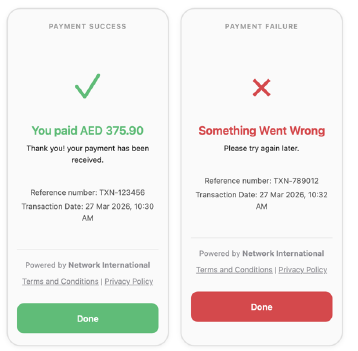
The payment success and failure screens have been redesigned to improve clarity and consistency.
Result Screen Updates
| Previous Label | Updated Label |
|---|---|
| Transaction ID | Reference Number |
| Date / Time | Transaction Date |
Additional changes include:
- Green success titles
- Red failure titles
- Updated footer layout
- Card provider branding
- Clickable legal links
Payment Result Screen Preview
SDK Theming System
Merchants can now customise SDK branding and colours programmatically.
Supported APIs
| API | Description |
|---|---|
SDKConfig.setColor(resId, color) | Override SDK colour resources at runtime |
SDKConfig.setMerchantLogo(resId) | Configure a custom merchant logo |
SDKConfig.setLanguage("en" | "ar" | "fr") | Set SDK language |
Supported Colour Overrides
- Disabled button backgrounds
- Disabled button text
- Pay button colours
- Payment option radio buttons
- Section separators
- Footer text
Localization
New French Language Support
French translations have been added across all SDK payment flows, including:
- Card payments
- AANI Pay
- Click to Pay
- Payment result screens
- Visa instalments
- Partial authorisation flows
Arabic Translation Updates
This release also includes updated Arabic translations for:
- AANI QR flows
- Payment messages
- Mobile number fields
- Reference number terminology
- Transaction date terminology
Technical Updates
| Area | Update |
|---|---|
| Target SDK | Upgraded from SDK 34 to SDK 36 |
| Android Compatibility | Android 15+ support |
| 3DS Navigation | Migrated to OnBackPressedCallback |
| Kotlin Compiler | Updated to version 1.5.8 |
| HTTP Support | Added DELETE method support |
| CI/CD | GitHub Actions upgraded to v4 |
| ProGuard | Migrated to proguard-android-optimize.txt |
| SDK Version | Updated to v7.0.0 |
Demo App Enhancements
The demo application now includes a full environment management system for easier testing across multiple merchant configurations.
Environment Management Features
- Add merchant environments
- Edit saved environments
- Delete environments
- Activate environments dynamically
- Import configurations using QR codes
QR Code Import Workflow
Developers can scan QR codes containing merchant credentials to instantly configure environments.
Supported QR Fields
| Field | Required |
|---|---|
| Nickname | Optional |
| Realm | Required |
| Outlet Reference | Required |
| API Key | Required |
Chucker HTTP Debugger
Debug builds now include Chucker, an in-app HTTP inspector that allows developers to inspect SDK network traffic directly on-device.
Chucker is automatically excluded from release builds.
Application Initialisation
A new DemoApplication class now handles SDK initialisation during application startup.
This replaces the previous per-Activity initialisation approach.
Additional Notes
All demo application changes are limited to the
app/module and do not impact integrator implementations directly.
This release notes document was generated from the release/7.0.0-beta branch for Android SDK version 7.0.0.