

Refund a payment taken on a Network International POS terminal using the N-Genius Online API.
Use the POS refunds API to refund a payment that was taken on a Network POS terminal. It is a different API from the one used for online orders, with its own base path, /unified-reporting/.
| You want to refund | Use |
|---|---|
| A payment taken on a Network International POS terminal | This API |
| An online order: payment page, Direct API or SDKs | Refund a Capture or Refund a Purchase |
How it works
A refund takes three calls: get an access token, find the original transaction by its approval code, then refund it.
sequenceDiagram
    participant C as Cardholder
    participant M as Your system
    participant N as N-Genius Online
    C->>M: Asks for a refund and shows the receipt
    M->>N: 1. Request an access token
    N-->>M: Access token, valid for 300 seconds
    M->>N: 2. Search transactions by approval code and date
    N-->>M: Matching transactions, each with a transaction ID
    Note over M: More than one match? Filter by MID, TID, card last four or RRN
    M->>N: 3. Refund the transaction ID for an amount
    N-->>M: Refund result, with its status
    M->>C: Confirms the outcome
Before you start
Ensure that:
-
The POS refund service is enabled for your outlet. Your Network International account representative can assist with this enablement.
The authority refunds service is disabled. If it is enabled, every refund request fails with a 422 error.
-
You have an POS MID Service Account API key to request access tokens.
-
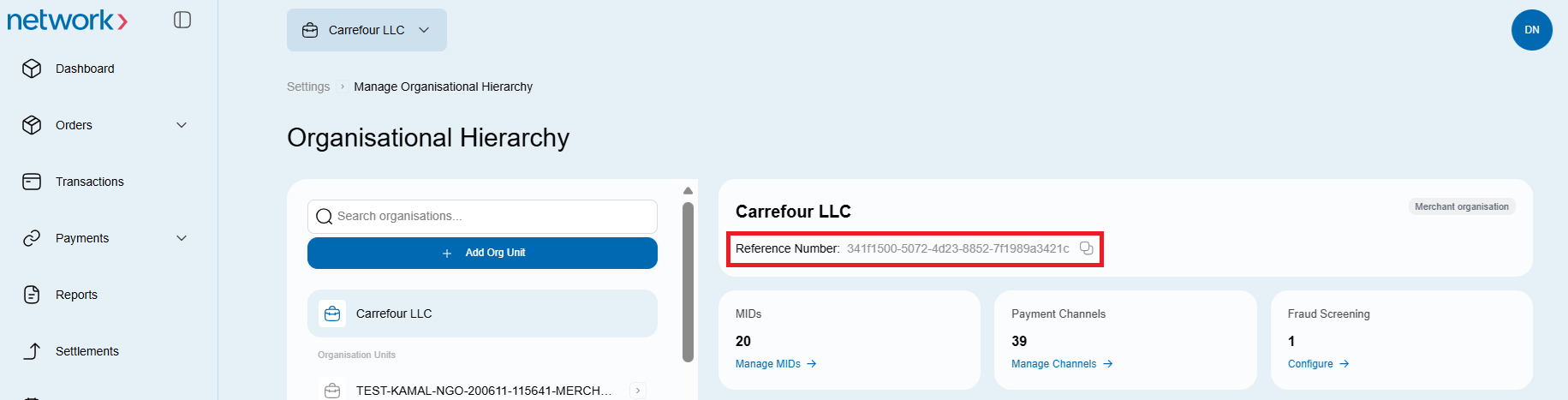
You know your merchant reference. It goes in the request path as
merchantId. It is a UUID shown in the N-Genius Online portal, not the 12-character MID printed on statements and receipts.
Which payments can be refunded, and which payment methods are excluded, is set out in Refund POS transactions through the API. Check a transaction against those rules before you send a refund; each rule that fails returns its own error, listed in Errors and troubleshooting.
Environments
| Environment | Base URL | Use |
|---|---|---|
| Sandbox | https://api-gateway.sandbox.ngenius-payments.com | Integration testing, with sandbox credentials |
| Live | https://api-gateway.ngenius-payments.com | Real refunds, with live credentials |
Step 1: Get an access token
POS refunds use the same identity service as every other N-Genius API. The full reference is at Generate access token or refresh token.
curl --request POST \
  'https://api-gateway.sandbox.ngenius-payments.com/identity/auth/access-token' \
  --header 'Authorization: Basic <your_api_key>' \
  --header 'Content-Type: application/vnd.ni-identity.v1+json' \
--header 'Accept: application/vnd.ni-identity.v1+json'{
"access_token": "eyJhbGciOiJSUzI1N...0eDloZnVRI",
"expires_in": 300,
"refresh_expires_in": 1800,
"refresh_token": "eyJhbGciOi...eDloZnVRIn0",
"token_type": "bearer"
}Send the token as Authorization: Bearer <access_token> on every later call. It expires after 300 seconds, so request a new one when it lapses rather than storing it.
Keep credentials on your serverNever put an API key or access token in client-side code, logs or shared documents. Use sandbox credentials only in sandbox and live credentials only in live, and rotate keys periodically.