

Fraud Screening
Assess transactions with N-Genius Online fraud screening, handle rejected payments and distinguish successful authorisation reversals from successful payments.
Use N-Genius Online fraud screening to assess transactions and handle rejected payments before releasing goods or services.
N-Genius Online combines customisable internal risk rules, 3-D Secure (cardholder authentication) protocols and enhanced screening from a fraud engine.
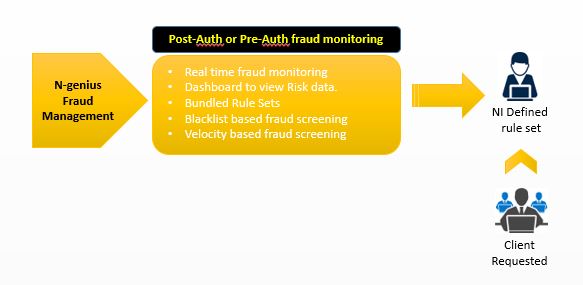
Enhanced fraud screening
Enhanced fraud screening takes place after 3-D Secure (3DS) authentication and issuer authorisation. This model is known as post-authorisation fraud screening.
Handle rejected transactions
- Merchant: If you use enhanced screening, do not deliver goods or services when fraud screening rejects a transaction.
- Developer: Distinguish a successful authorisation reversal from a successful payment when handling transaction outcomes. N-Genius Online automatically initiates an authorisation reversal after a fraud rejection to remove the hold on the cardholder's account and release their funds.
- Merchant: Keep goods or services on hold after a successful reversal. The reversal releases the cardholder's funds; it does not confirm payment.
A successful reversal is not a successful paymentA successful authorisation reversal does not mean the payment succeeded. Do not release goods or services for a rejected transaction.
Example: successful reversal after rejection
Fraud screening rejects a transaction, and N-Genius Online initiates an authorisation reversal. The reversal returns a successful status, releasing the cardholder's funds. Treat the payment as rejected and do not deliver goods or services.
Optional: override a fraud rejection
The Fraud Override service supports manual overrides of a Fraud Reject outcome.
- Merchant: Contact your relationship manager to request the Fraud Override service for your account. Network International credit risk must approve the request.
- Merchant: Before manually overriding a Fraud Reject outcome, contact the cardholder to confirm the transaction's authenticity.
Fraud-screening benefits
| Benefits |
|---|
Customised screening
|
Custom rule sets
|
Machine learning
|
Dynamic authentication (3DS)
|
Managed fraud services
|
Operational fraud reporting
|
Updated 6 days ago