
Add a Custom Message to the Payment Page
You can display a custom message on the Hosted Payment Page to communicate important information to customers during checkout.
This message appears above the payment details and can be used for announcements, instructions, or reassurance messages.
Configure the Message
- Sign in to the merchant portal
- Click on Settings, and then click on the Branding panel
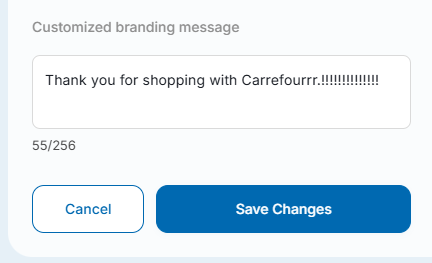
- On the left side of the Pay Page Branding page, scroll down to the "Customized branding message" field. Enter your custom message into this field
- Save your changes
Message Requirements
- Maximum length: 256 characters
- Plain text only
- Displayed on the checkout page during payment
Typical Use Cases
Merchants commonly use this feature to:
- Provide delivery or service information
- Display promotional or seasonal messages
- Communicate support details
- Reassure customers about secure payment processing
Notes
- Changes take effect immediately after saving
- The message is displayed to all customers using the Hosted Payment Page
- This feature does not require any integration changes
Updated 10 days ago
Did this page help you?