

Slice Instalment Payments
Slice Instalment Payments (Easy Payment Plan - EPP) allows eligible customers to split purchases into interest-free installments during checkout.
By offering flexible payment options, merchants can improve affordability for customers, increase conversion rates, and reduce purchase hesitation for higher-value transactions.
Benefits
Slice helps merchants:
- Offer flexible installment payment options to eligible customers
- Improve checkout conversion rates
- Increase average order values
- Provide a seamless checkout experience without additional merchant integration complexity
- Support customers who prefer to spread payments over time
How Slice Works
During checkout, eligible customers are presented with available installment plans after entering their card details.
If the customer qualifies for Slice, they can select an installment option and continue with their purchase. If Slice is unavailable or the customer chooses not to use it, the payment continues through the standard payment flow.
flowchart LR

A[Customer enters card details]
--> B[Eligibility Check]

B --> C{Eligible?}

C -->|Yes| D[Plans Displayed]
D --> E[Customer Selects Plan]
E --> F[Payment Authorised]

C -->|No| G[Standard Payment Flow]
Supported Channels
Slice is available across multiple N-Genius Online payment channels:
| Channel | Supported |
|---|---|
| Hosted Session | Yes |
| Pay Page | Yes |
| Direct API | Yes |
| Android SDK | Yes |
| iOS SDK | Yes |
Enablement
Slice must be enabled before it becomes available to customers.
Merchant Enablement
- Contact your Network International representative.
- Request Slice (Easy Payment Plan) enablement.
- Configure the minimum transaction threshold.
- Complete testing and validation activities before enabling the feature in production.
Eligibility Requirements
A customer must satisfy all eligibility requirements before Slice is displayed during checkout.
Transaction Type
Supported:
- Purchase transactions
Not supported:
- Sale transactions
- Authorization-only transactions
- Capture transactions
- Device payment transactions
Currency
Supported currency:
- AED
Transaction Threshold
The transaction amount must meet or exceed the configured minimum threshold before Slice becomes available.
Card Eligibility
Slice availability depends on the customer's card and issuer eligibility. Customers with unsupported cards will continue through the standard payment journey.
Customer Checkout Journey
Step 1 – Card Entry
The customer enters their card details during checkout.
[Insert Checkout Screen Image]
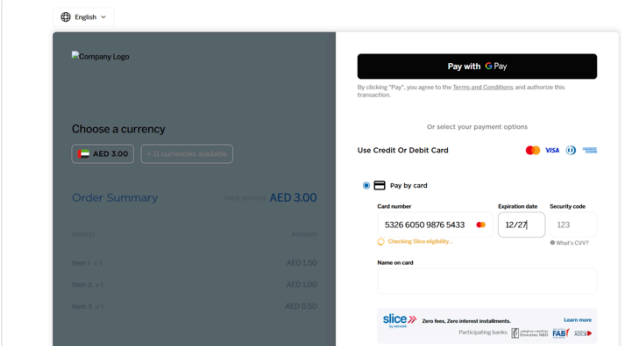
Step 2 – Installment Eligibility
N-Genius Online validates whether the customer is eligible for Slice installment payments.
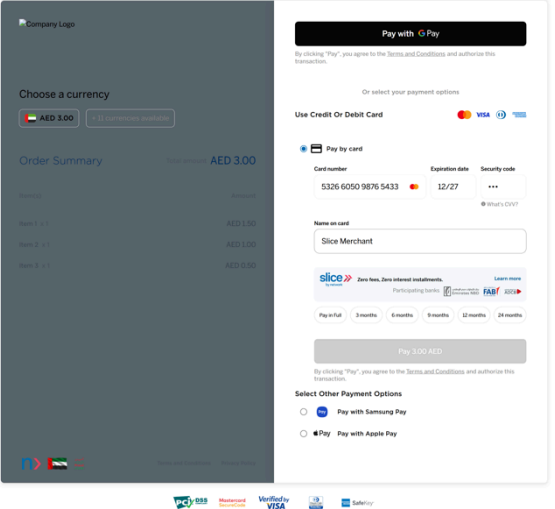
Step 3 – Available Plans Displayed
If eligible, available installment plans are presented to the customer.
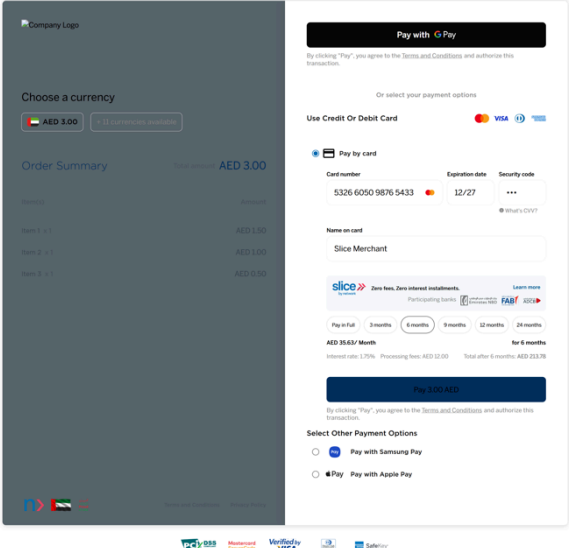
Step 4 – Customer Selection
The customer can:
- Select an available Slice installment plan
- Continue with a standard payment
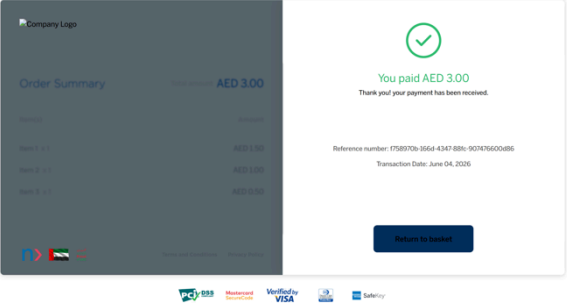
Step 5 – Payment Completion
The payment is authorised and processed using the selected installment plan.
Reporting & Visibility
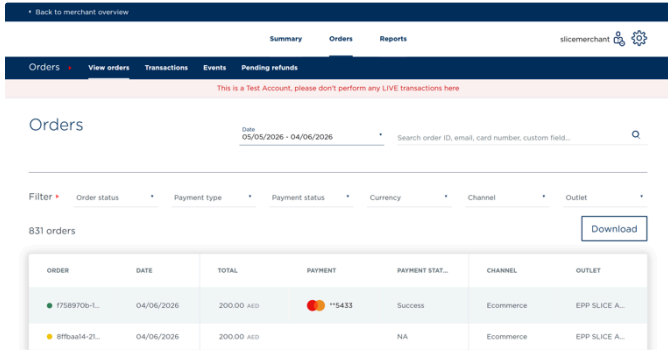
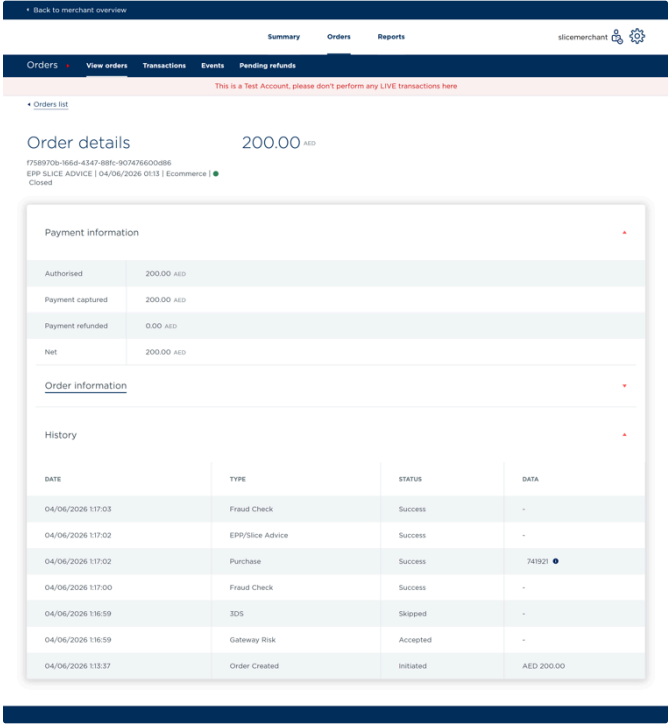
Slice transactions remain visible within the N-Genius Online platform and can be viewed through:
- Reports
- Order Details
- Order History
- Transaction Listings
This allows merchants to monitor installment transactions alongside standard payment activity.
Frequently Asked Questions
Does Slice require a separate integration?
No. Slice is supported through existing N-Genius Online payment channels once enabled.
What happens if a customer is not eligible?
The customer simply continues through the standard payment journey.
Can merchants configure a minimum purchase amount?
Yes. Merchants can configure a minimum transaction threshold that must be met before Slice becomes available.
Does Slice support all currencies?
No. Slice currently supports AED transactions only.
Where can I view Slice transactions?
Slice transactions are visible within Reports, Order Details, Order History, and Transaction Listings within N-Genius Online.
Next Steps
To enable Slice Installment Payments for your business, contact your Relationship Manager or support team.
Updated 23 days ago